Duration Filter
The Duration Filter can be used to select interactions with a Minimum or Maximum duration, or both. When the Duration Filter is set to All, there is no filter on duration and all records pass that filter. To set a duration filter, click on the Between button.
Setting a Minimum duration and leaving the Maximum blank means that interactions with a duration less than the Minimum are filtered out, but there is no maximum duration. Setting a Maximum duration and leaving the Minimum blank means that interactions with a duration greater than the Maximum are filtered out, but there is no minimum duration.
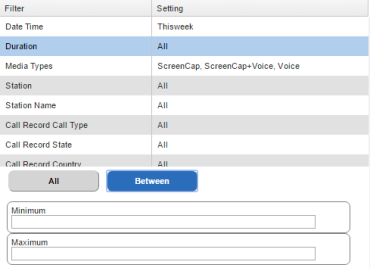
Duration Filter
Setting both a Minimum and Maximum duration will filter out any interactions whose durations fall outside of that range.
If there is a duration filter set other than All, this will filter out any interactions that have no duration. This includes photos, emails, text messages, etc. The only way to include these non-duration events in the search results is to set the Duration Filter to All.
Typing in a number without colons is assumed to be several seconds and converted to the format below. For example, typing in the number 120 would be converted to 0:02:00, or two minutes.